Cloud Computing Explained for Beginners: Ultimate Guide to Get Started
Imagine having access to all your files, apps, and data anytime you want, from anywhere in the world. Sounds powerful, right?
That’s exactly what cloud computing offers. If you’ve ever wondered how this technology works or why it’s become so important, you’re in the right place. By the end of this article, you’ll understand cloud computing in simple terms and see how it can make your life easier—whether you’re managing personal projects or running a business.
Ready to unlock the secrets of the cloud? Let’s dive in.
What Is Cloud Computing
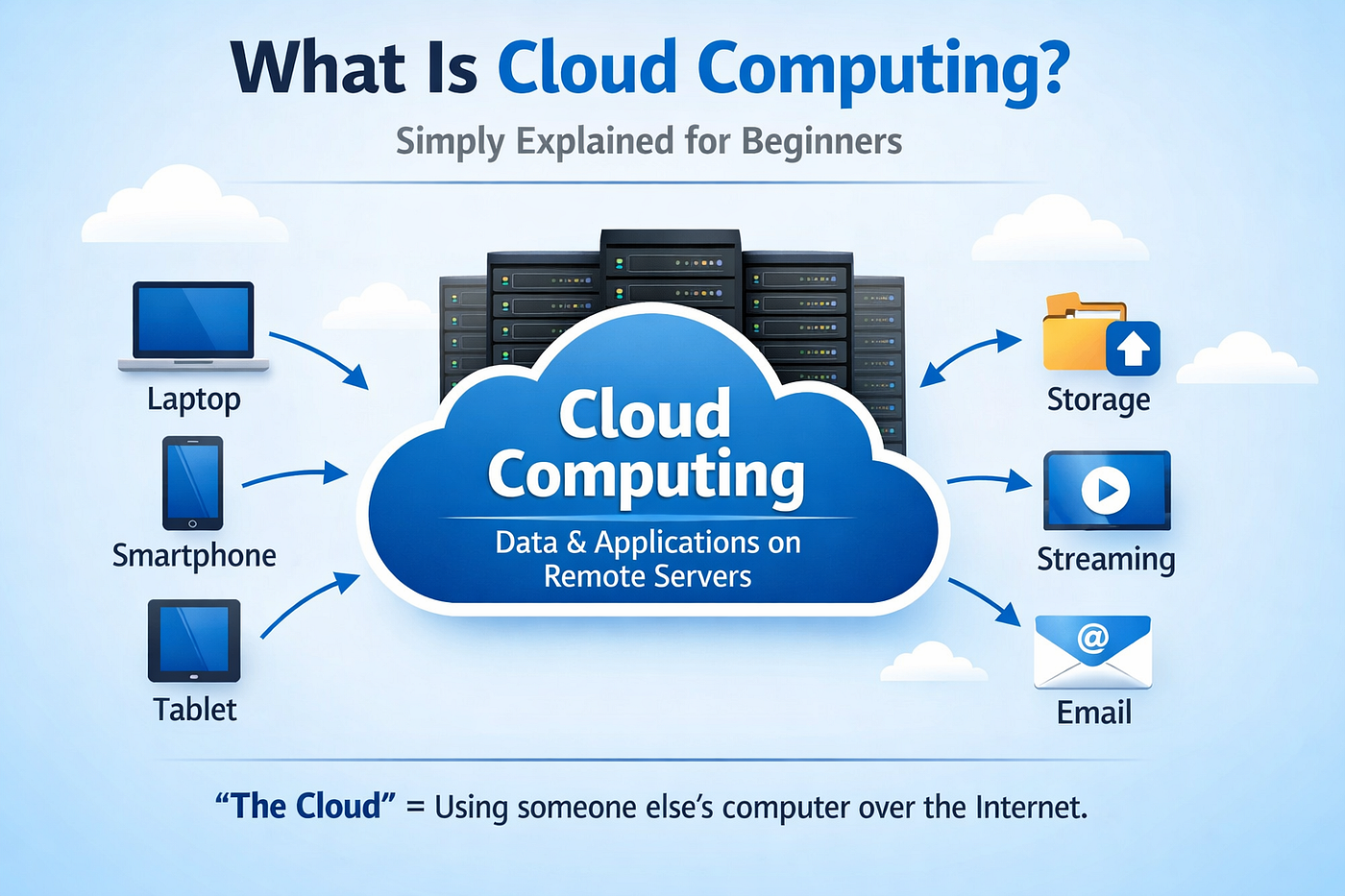
Cloud computing lets you use computer resources over the internet. It means you do not need to keep all software or data on your own computer. Instead, you access them through servers hosted elsewhere.
This approach changes how people and businesses use technology. It offers flexibility, lowers costs, and improves access to information.
What Is Cloud Computing?
Cloud computing means delivering computing services through the internet. These services include storage, servers, databases, networking, and software. Users can access these services anytime from any device with internet.
How Does Cloud Computing Work?
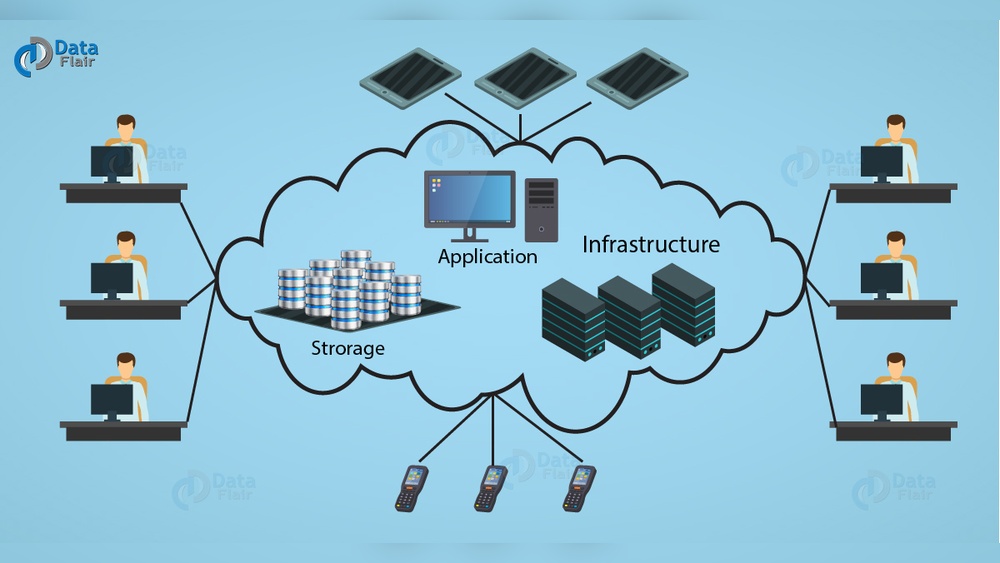
Cloud providers run large data centers. These centers hold powerful servers and storage systems. Users connect to these centers via the internet to use resources. This setup removes the need for physical hardware on the user side.
Types Of Cloud Computing
There are three main types: public, private, and hybrid clouds. Public clouds serve many users and are managed by providers. Private clouds serve a single organization. Hybrid clouds combine both for more flexibility.
Common Uses Of Cloud Computing
People use cloud computing for email, file storage, and app hosting. Businesses use it for data backup, software development, and customer support. The cloud helps handle tasks faster and with less hardware.
Types Of Cloud Services
Cloud computing offers several types of services. Each serves a different purpose. Understanding these helps beginners choose the right cloud solution. The main types include Infrastructure as a Service, Platform as a Service, and Software as a Service. These services range from basic hardware to full software applications available online.
Infrastructure As A Service (iaas)
IaaS provides virtualized computing resources over the internet. It includes servers, storage, and networking hardware. Users can rent these resources instead of buying physical equipment. This saves money and offers flexibility. Companies can scale resources up or down as needed. It is ideal for businesses that want control over their infrastructure without managing physical devices.
Platform As A Service (paas)
PaaS offers a platform for developers to build and deploy applications. It includes operating systems, development tools, and databases. Users do not worry about hardware or software maintenance. This speeds up the development process. PaaS supports collaboration among developers. It is perfect for creating web or mobile apps quickly and easily.
Software As A Service (saas)
SaaS delivers software applications over the internet. Users can access these apps through a web browser. There is no need to install or update software manually. SaaS is user-friendly and works on multiple devices. Common examples include email services, office tools, and customer management systems. This service suits users who want ready-to-use software without technical setup.
Cloud Deployment Models
Cloud deployment models describe how cloud services are made available to users. Each model offers different levels of control, security, and management. Understanding these models helps businesses choose the right cloud setup for their needs.
Public Cloud
Public cloud is a service offered to the general public over the internet. Providers manage all hardware and software resources. It is cost-effective and easy to scale. Many companies use public clouds for apps and storage.
Private Cloud
Private cloud is dedicated to one organization. It offers more control and security than public clouds. Companies use private clouds to protect sensitive data. It can be hosted on-site or by a third party.
Hybrid Cloud
Hybrid cloud combines public and private clouds. It allows data and apps to move between both environments. Businesses use hybrid clouds to balance flexibility and security. This model supports changing workloads efficiently.
Community Cloud
Community cloud is shared by several organizations with common goals. It supports collaboration and resource sharing. This model suits industries with similar security needs. Costs and responsibilities are distributed among participants.
Benefits Of Cloud Computing
Cloud computing offers many benefits that help businesses and individuals work better. It saves money, makes tasks easier, and keeps data safe. Understanding these benefits can help you see why cloud computing is so popular today.
Cost Efficiency
Cloud computing cuts costs by removing the need for physical hardware. You pay only for the services you use. This saves money on maintenance and upgrades. Small businesses especially gain from lower upfront costs.
Scalability
Cloud services grow with your needs. You can add or reduce resources quickly. This means your business can handle more work without delays. Scaling up or down takes just a few clicks.
Accessibility
Access your data and apps from anywhere with internet. Work from home, office, or on the go. Devices like phones, tablets, or laptops all connect easily. This flexibility improves teamwork and productivity.
Disaster Recovery
Cloud computing keeps your data safe during emergencies. Automatic backups help restore information fast. It protects against hardware failures or natural disasters. This reduces downtime and loss of important files.
Common Cloud Providers
Cloud computing offers many choices for businesses and individuals. Common cloud providers supply the tools and services needed to store data and run applications online. These providers have data centers worldwide to keep your information safe and accessible.
Each provider has unique features and pricing plans. Picking the right one depends on your needs and budget. Here are some popular cloud providers you might hear about.
Amazon Web Services (aws)
AWS is one of the largest cloud providers. It offers many services such as storage, computing power, and databases. AWS is trusted by startups and big companies alike.
The platform is known for its flexibility and strong security. Users can scale resources up or down quickly. AWS also supports many programming languages and tools.
Microsoft Azure
Microsoft Azure is popular for its integration with Microsoft products. It works well with Windows and Office software. Azure provides virtual machines, databases, and AI services.
Businesses using Microsoft software find Azure easy to adopt. It offers strong support for hybrid cloud solutions. Azure helps companies manage data both on-site and online.
Google Cloud Platform
Google Cloud Platform focuses on data and machine learning tools. It is good for big data analysis and app development. Google Cloud offers fast networking and reliable storage.
Developers enjoy its simple interface and strong open-source support. Google’s global network helps deliver quick response times. It also includes tools for container management and AI.
Other Providers
Other cloud providers include IBM Cloud, Oracle Cloud, and DigitalOcean. These companies offer specialized services for different needs. Small businesses often choose DigitalOcean for simple and affordable plans.
IBM Cloud focuses on enterprise-level security and AI. Oracle Cloud is strong in database management. Each provider offers unique options worth exploring.
How To Choose A Cloud Service
Choosing the right cloud service is a key step for any business. The right choice can save money, increase efficiency, and improve security. It depends on several important factors that each business must consider carefully.
Understanding your needs and priorities helps find the best cloud service. Focus on what matters most for your business. This guide will explain the main points to check before making a decision.
Assessing Business Needs
Start by listing what your business requires from a cloud service. Think about storage, computing power, and software needs. Consider the size of your team and how they work. Check if you need to scale up quickly or keep things small. The cloud should support your daily tasks and future growth.
Security Considerations
Security is a top priority in cloud computing. Make sure the provider uses strong data protection methods. Look for encryption, firewalls, and regular security updates. Check if the service follows industry standards and regulations. Your data must stay safe from threats and breaches.
Budget And Pricing Models
Cloud services offer different pricing plans. Some charge by usage, others by subscription. Understand the cost structure and what fits your budget. Watch for extra fees, like data transfer or support charges. Choose a plan that matches your business size and spending limits.
Support And Reliability
Reliable cloud service means less downtime and fewer problems. Check the provider’s uptime history and service guarantees. Good customer support is essential for quick issue resolution. Find out if help is available 24/7 and how to contact them. Reliable service keeps your business running smoothly.
Setting Up Your First Cloud Account
Setting up your first cloud account is the first step to using cloud computing. This process helps you access many online services and tools. You will learn how to create an account, find your way around the dashboard, choose the right services, and start your first project. This guide makes it simple and clear for beginners.
Creating An Account
Start by visiting the cloud provider’s website. Click on the sign-up or create account button. Enter your email, create a password, and fill in basic personal details. Verify your email address to activate the account. Some providers may ask for a phone number or payment method. Don’t worry; many offer free plans for beginners.
Navigating The Dashboard
Once logged in, you will see the dashboard. It is the main control panel for your cloud account. The dashboard shows your current projects, usage, and available services. Look for menus or icons to explore different areas. Spend a few minutes clicking around. This helps you become familiar with the layout and options.
Selecting Services
Cloud providers offer many services like storage, computing, and databases. Choose services based on your project needs. Start small to avoid confusion. For example, select cloud storage to save files or virtual machines to run software. Each service has simple instructions to guide you. You can add more services later as you learn.
Launching Your First Project
After selecting services, it’s time to start a project. Most dashboards have a button to create or launch a new project. Name your project clearly to keep things organized. Follow the steps provided by the platform to set up resources. This may include choosing a region or setting access permissions. Once ready, you can begin using your cloud resources.
Essential Cloud Tools And Services
Cloud computing offers many tools and services that make digital work easier. These tools help you store data, run applications, and manage networks without owning physical hardware. Understanding essential cloud tools helps beginners use cloud services confidently.
Storage Solutions
Cloud storage keeps your files safe on remote servers. It allows easy access from any device with internet. You can save documents, photos, and backups without worrying about losing data. Many cloud providers offer scalable storage, so you pay only for what you use.
Compute Resources
Compute resources provide the power to run applications and processes online. Instead of using your computer, you use virtual machines or containers in the cloud. This lets you handle complex tasks and large workloads without buying expensive hardware. You can quickly increase or decrease computing power as needed.
Networking Features
Networking in the cloud connects your resources securely and efficiently. It includes virtual private networks (VPNs), load balancers, and firewalls. These features help control traffic and protect data from unauthorized access. Cloud networking makes it easier to build and manage global applications.
Monitoring And Management
Monitoring tools track the performance of your cloud resources. They alert you if something goes wrong or slows down. Management services let you control access, set rules, and automate tasks. These tools keep your cloud environment healthy and secure with less effort.
Common Challenges And Solutions
Cloud computing offers many benefits but also has challenges. Knowing these issues helps users prepare and act wisely. Simple solutions can reduce problems and improve cloud use.
Security Risks
Cloud systems face threats like hacking and data theft. Users worry about sensitive information safety. Strong passwords, encryption, and multi-factor authentication protect data. Regular security updates and monitoring catch issues early.
Cost Management
Cloud costs can rise quickly if not controlled. Users may pay for unused resources or overprovision. Tracking usage and setting budgets helps control spending. Choose plans that fit your actual needs to save money.
Data Migration
Moving data to the cloud can be complex and slow. Data loss or downtime may occur during transfer. Careful planning and backup reduce risks. Using trusted tools and experts makes the process smoother.
Performance Issues
Cloud speed depends on internet and server quality. Slow connections can affect work and user experience. Select providers with reliable networks and fast servers. Testing performance before full use helps avoid surprises.
Future Trends In Cloud Computing
Cloud computing continues to grow and change fast. New trends are shaping how people and businesses use the cloud. These trends make cloud services smarter, faster, and more efficient. Understanding these trends helps beginners see where cloud computing is headed next.
Edge Computing
Edge computing moves data processing closer to users. It cuts down delays and speeds up responses. Devices like smartphones and sensors can process data nearby. This reduces the need to send everything to a distant cloud. Edge computing supports real-time apps like gaming and smart cities.
Serverless Architecture
Serverless architecture lets developers build apps without managing servers. Cloud providers handle all the server work. This means less setup and easier scaling. Developers focus on code, not hardware. Serverless can save time and reduce costs for small and big projects.
Artificial Intelligence Integration
AI tools are becoming part of cloud services. They help analyze data and automate tasks. AI improves security by spotting threats quickly. It also personalizes user experiences. Cloud platforms with AI make apps smarter and more useful.
Sustainability Efforts
Cloud providers work to reduce energy use and carbon emissions. They use renewable energy and optimize data centers. Efficient cloud services lower environmental impact. Choosing green cloud options supports a healthier planet.

Frequently Asked Questions
What Is Cloud Computing In Simple Terms?
Cloud computing means storing and accessing data over the internet instead of on a local computer. It allows users to use computing resources like servers, storage, and software remotely, making technology more flexible and scalable.
How Does Cloud Computing Benefit Beginners?
Cloud computing offers beginners easy access to powerful tools without expensive hardware. It saves time, reduces costs, and allows quick scaling of resources as needed, making technology more accessible.
What Are The Main Types Of Cloud Services?
The three main cloud services are Infrastructure as a Service (IaaS), Platform as a Service (PaaS), and Software as a Service (SaaS). Each offers different levels of control, flexibility, and management.
Is Cloud Computing Secure For Beginners?
Yes, cloud providers invest heavily in security measures. They use encryption, firewalls, and regular updates to protect data, making cloud computing safe for users, including beginners.
Conclusion
Cloud computing makes using technology easier and faster. It helps save money and time for many people. You can store files, run apps, and work from anywhere. It suits both beginners and experts well. Understanding the basics opens many doors in today’s digital world.
Start exploring cloud services at your own pace. This knowledge will help you stay up to date and confident. Keep learning, and the cloud will become a useful tool in your life. Simple steps lead to big benefits with cloud computing.