How to Protect Yourself from Online Scams: Essential Safety Tips
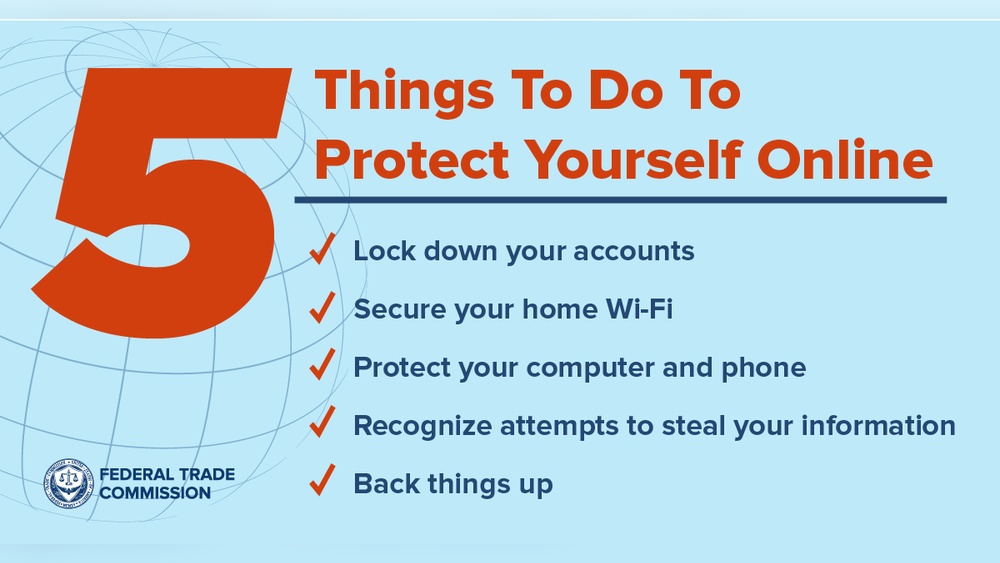
You could lose more than money to online scams—they can steal your personal information, damage your credit, and leave you feeling vulnerable. But here’s the good news: you don’t have to be an easy target.
By learning simple, effective ways to spot and avoid scams, you can protect yourself and your loved ones from falling into these traps. Keep reading to discover practical tips that will help you stay safe every time you go online.
Your security starts with what you know.
Common Types Of Online Scams
Online scams are tricks used by criminals to steal money or personal details. They come in many forms and can be hard to spot. Knowing the common types helps you stay safe. Recognize these scams to protect yourself and your information.
Phishing Attacks
Phishing attacks use fake emails or messages. They look real but try to steal passwords or credit card details. These messages often ask you to click a link or download a file. Always check the sender’s address and never share sensitive data.
Fake Online Stores
Fake online stores promise great deals but deliver nothing. They copy real websites or create new ones that seem trustworthy. These stores take your money but never send the products. Verify the store’s reviews and payment methods before buying.
Lottery And Prize Scams
Lottery and prize scams tell you that you won money or a prize. They ask for fees or personal details to claim it. Real lotteries do not ask for upfront payments. Be careful with messages claiming you won something unexpected.
Tech Support Frauds
Tech support frauds pretend to fix computer problems. Scammers call or pop up on your screen. They say your device is at risk and ask for payment. Never give control of your computer to strangers or pay for unknown services.
Romance Scams
Romance scams trick people by pretending to be a romantic partner. Scammers build trust and then ask for money. They often claim emergencies or travel costs. Keep your guard up and never send money to someone you only met online.
Recognizing Scam Red Flags
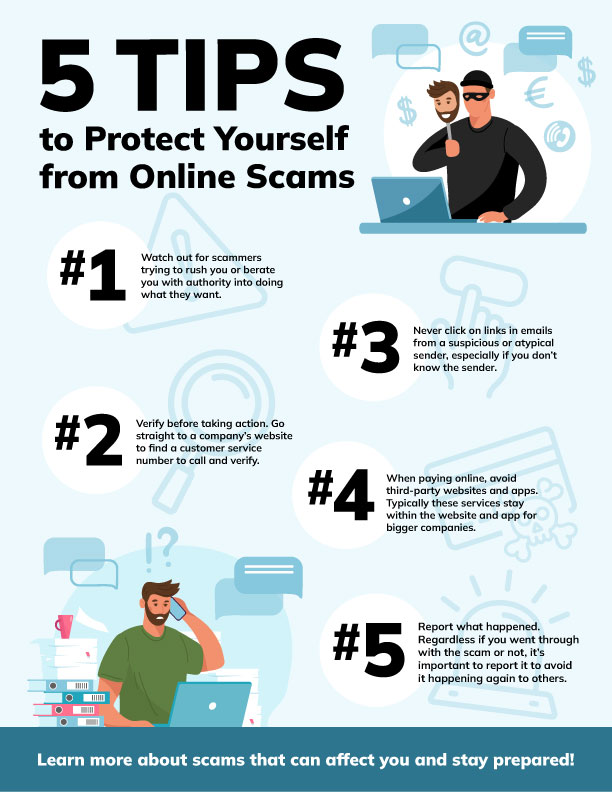
Recognizing scam red flags helps protect you from online fraud. Scammers use tricks to steal your money or personal details. Spotting warning signs early can stop scams before they cause harm.
Suspicious Email And Messages
Scam emails often come from unknown senders. They may have strange addresses or misspelled words. Avoid clicking links or downloading attachments in these messages. Legitimate companies rarely ask for sensitive info by email.
Unrealistic Offers
Offers that sound too good to be true usually are. Promises of huge prizes or free gifts can be traps. Be careful with deals that ask for money upfront. Trust only offers from known and trusted sources.
Urgency And Pressure Tactics
Scammers create fake urgency to rush your decisions. They say you must act now or lose a prize. Do not let pressure force you to act fast. Take time to verify before responding or paying.
Requests For Personal Information
Never share passwords, social security numbers, or bank details online. Legitimate businesses do not ask for this info through email or calls. Protect your personal data as you would your money.
Securing Personal Information
Protecting your personal information is key to avoiding online scams. Scammers want your data to steal money or identity. Guarding your details keeps you safe and secure online.
Strong habits help stop criminals from accessing your accounts. Learn simple steps to protect what matters most.
Strong Password Practices
Create passwords that are hard to guess. Use a mix of letters, numbers, and symbols. Avoid common words or easy patterns like “12345” or “password”. Change passwords regularly. Use different passwords for each account.
Two-factor Authentication
Turn on two-factor authentication (2FA) for your accounts. It adds an extra step to verify your identity. Usually, a code is sent to your phone. This stops scammers even if they know your password.
Safe Browsing Habits
Only visit trusted websites. Check for “https” and a padlock in the address bar. Do not click on unknown links or ads. Avoid sharing personal details on public Wi-Fi. Clear your browser history and cookies often.
Safe Online Shopping Tips
Shopping online offers great convenience but comes with risks. Scammers create fake sites to steal money or information. Safe online shopping helps avoid these traps. Follow clear steps to protect your data and payments.
Checking Website Legitimacy
Start by verifying the website’s address. Look for “https://” at the start of the URL. The “s” means the site uses secure encryption. Check for a padlock icon near the address bar. Scan the site for contact details and physical address. Read user reviews outside the website to confirm trust. Avoid sites with many spelling errors or poor design. Trust your instincts—if something feels off, leave the site.
Using Secure Payment Methods
Choose payment options that offer buyer protection. Credit cards and PayPal are safer than direct bank transfers. Avoid paying with wire transfers or gift cards. Never save your payment details on unfamiliar sites. Use strong, unique passwords for each shopping account. Enable two-factor authentication if available. These steps reduce risks from hackers and fraud.
Reviewing Return And Privacy Policies
Read the return policy carefully before buying. Know if you can return or exchange products easily. Check for hidden fees or restocking charges. Review the privacy policy to see how your data is used. Avoid sites that share your information with third parties. Keep a copy of these policies for reference. Clear policies show the seller is trustworthy and professional.
Protecting Devices And Networks
Protecting your devices and networks is key to staying safe online. Scammers often target weak spots in your computer, phone, or internet connection. Taking simple steps can block many threats. These steps help keep your personal information secure and your devices running well.
Installing Antivirus Software
Antivirus software finds and removes harmful files. It stops many viruses, spyware, and malware from damaging your device. Choose a trusted antivirus program and install it on all your devices. Keep it running and scan your device regularly. This software acts as a shield against online dangers.
Keeping Software Updated
Software updates fix security holes and improve device performance. Hackers often use old software weaknesses to break in. Turn on automatic updates for your operating system and apps. Update your devices as soon as new versions are available. Staying updated reduces the chance of falling victim to scams.
Using Secure Wi-fi Connections
Public Wi-Fi networks are often unsafe. Scammers can intercept your data on these networks. Use Wi-Fi with strong passwords at home or trusted places. Avoid accessing sensitive accounts on open networks. Consider using a Virtual Private Network (VPN) to encrypt your connection and stay private.
Responding To Suspected Scams
Responding quickly and correctly to suspected online scams helps protect your money and personal information. Taking the right steps can stop scammers from causing more harm. Knowing where to report, who to notify, and how to block scammers keeps you safe online.
Reporting To Authorities
Report scams to local law enforcement or cybercrime units. Many countries have special agencies for online fraud. Providing details helps catch scammers and warn others. Use official websites to file reports safely and securely. Reporting builds a record that can lead to investigations.
Notifying Financial Institutions
Contact your bank or credit card company immediately after spotting a scam. They can freeze accounts or reverse charges to limit losses. Banks monitor suspicious activity and protect your accounts. Keep a list of emergency numbers for your financial institutions. Quick notification reduces the chance of theft or fraud.
Blocking And Deleting Scammers
Block scam calls, emails, and messages to stop contact. Most devices and apps let you block unwanted senders easily. Delete suspicious messages without clicking links or downloading files. Blocking reduces chances of falling for repeated scams. Staying firm keeps your online space safe and secure.
Frequently Asked Questions
What Are Common Signs Of Online Scams?
Common signs include unsolicited messages, urgent requests for money, spelling errors, and suspicious links. Scammers often impersonate trusted sources to gain your trust. Always verify the sender’s identity before responding or clicking links.
How Can I Verify If A Website Is Safe?
Check for “https” in the URL and a padlock icon. Use trusted security tools or website reputation checkers. Avoid websites with poor design, many pop-ups, or unknown domain names.
What Steps Should I Take If I Suspect A Scam?
Immediately stop all communication and avoid sharing personal details. Report the scam to relevant authorities and inform your bank if financial info was shared. Change passwords and monitor your accounts for unusual activity.
Can Antivirus Software Protect Me From Online Scams?
Yes, antivirus software can detect and block malicious links and attachments. It helps prevent malware infections that scammers use to steal data. Keep your software updated for the best protection.
Conclusion
Protecting yourself from online scams takes constant attention. Always check links and emails carefully. Never share personal details with strangers online. Use strong, unique passwords for every account. Stay updated on common scam tactics. Trust your instincts—if something feels wrong, pause.
Keep security software up to date on your devices. Being cautious can save you from loss and stress. Small steps make a big difference in online safety. Stay alert and protect your digital life every day.